Below is a map showing the different repeaters affiliated with PSDMR.
If you have a DMR repeater that is connected to the BrandMeister Network, please shoot us an email and we'll get you listed!
Reading the map
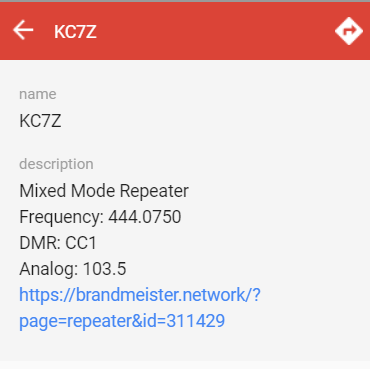
Clicking on each repeater on the map will open a window like the one shown.
- Repeater Mode
- There are only two options.
Mixed: The repeater will pass both analog and DMR modulation. Whatever modulation type comes in goes out. When operating in DMR the repeater is also connected to the BrandMeister Network.
DMR: The repeater only passes DMR modulation and is connected to the BrandMeister Network. - Frequency
- Lists the OUTPUT from the repeater; this would be the frequency that would be added to your radio under the Receive (RX) field. Currently all UHF repeaters utilize a +5.0 MHz offset, so this info is not shown.
- DMR
- This will list the Color Code of the repeater.
- Analog
- This will list the CTCSS or DCS tones for analog operation if applicable. Please note that the tone listed will be used for both TX and RX; this allows analog users to not hear the DMR modulation. It is highly recommended that you enable Busy Channel Lockout on these analog channels to prevent stepping on DMR users.
- Link
- This is the link to each repeater's listing on BrandMeister. This is helpful to see what talkgroups are assigned to what slots and who is using the repeater via the last heard dashboard.